Best AI Video Generator: 4 Models, 20 Videos Tested
Which AI video generator performs best? We tested Runway Gen-4, Grok Imagine, Veo 3.1 Fast and Kling 3.0 across three tasks. We generated 20 videos, repeated the same barista prompt three times per model, checked 15 requirements and compared actual generation costs.
The best AI video generator depends on the task. We tested four models across three scenarios and found no single winner. In the initial runs, the cheaper Runway Gen-4 and Grok Imagine models followed the instructions more accurately on two of the three tasks. But repeated generations showed that one successful video does not prove consistency: Kling 3.0 completed all five requirements of the barista task more often than the other models.
On November 11, 2026, we generated 20 videos. We first tested four models on a rainy city street, human movement and product photography. Then we ran the barista prompt two more times on each model. The complete experiment cost 890.45 credits ≈ 810 ₽. We did not select better takes or discard unsuccessful results.
This article includes the original prompts, requirement checklists, repeated generation results and actual prices. You can generate a video with AI in Neuromia using the same prompts and compare your results. The editor displays the price for your selected model and settings before you start.
How we tested the best AI video generators
We selected four models: Runway Gen-4, Grok Imagine, Veo 3.1 Fast and Kling 3.0.
Each model initially received the same three prompts. The first tested a realistic rainy street, the second required a barista to complete a sequence of actions, and the third focused on accurately generating a glass of hot tea.
After reviewing the initial results, we generated the barista scene twice more with each model. We kept the prompt, settings and test date unchanged.
Testing conditions:
- Date: November 11, 2026.
- Three tasks, with identical prompts across all four models.
- One attempt per model for the rainy street and glass of tea.
- Three attempts per model for the barista scene.
- Every result was kept, with no selection of better takes.
- The main evaluation criterion was whether the model followed specific prompt requirements.
For each task, we identified five requirements that could be checked in the generated video. Each received one of three ratings: "yes," "partly" or "no." Only a "yes" counted as fully completed.
This approach separates an attractive image from accurate instruction-following. A model might produce beautiful product footage while changing the shape of the product itself.
Model settings and video costs
| Model | Duration | Resolution | Sound | Price per video |
|---|---|---|---|---|
| Runway Gen-4 | 5 seconds | 720p | Not evaluated | 13.2 credits ≈ 12 ₽ |
| Grok Imagine | 6 seconds | 480p | Not evaluated | 15.84 credits ≈ 14 ₽ |
| Veo 3.1 Fast | 8 seconds | 720p | Enabled | 66 credits ≈ 60 ₽ |
| Kling 3.0 | 5 seconds | 720p | Disabled | 83.05 credits ≈ 75 ₽ |
Ruble amounts use an approximate conversion of 1 credit ≈ 0.91 ₽, rounded to whole rubles.
The first 12 videos cost 534.27 credits ≈ 486 ₽. The eight additional barista generations cost another 356.18 credits ≈ 324 ₽. The total was 890.45 credits ≈ 810 ₽.
The models used different settings, including duration, resolution and sound. We compared adherence to the prompts, not videos with identical technical specifications or prices.
You can view all twelve original videos in the section comparing AI models on identical prompts. We examine the additional barista attempts separately because they changed our initial assessment of model consistency.
Task 1. Realism and physics: a rainy city street
To test realistic AI video generation, we chose a city street at night. The models needed to show rainfall, a moving car, light reflections and pedestrians carrying umbrellas.
The prompt:
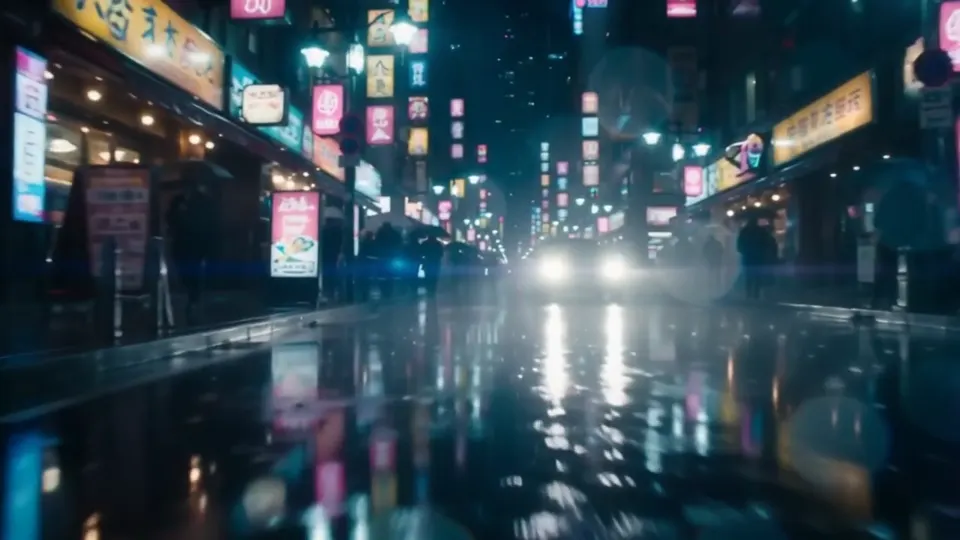
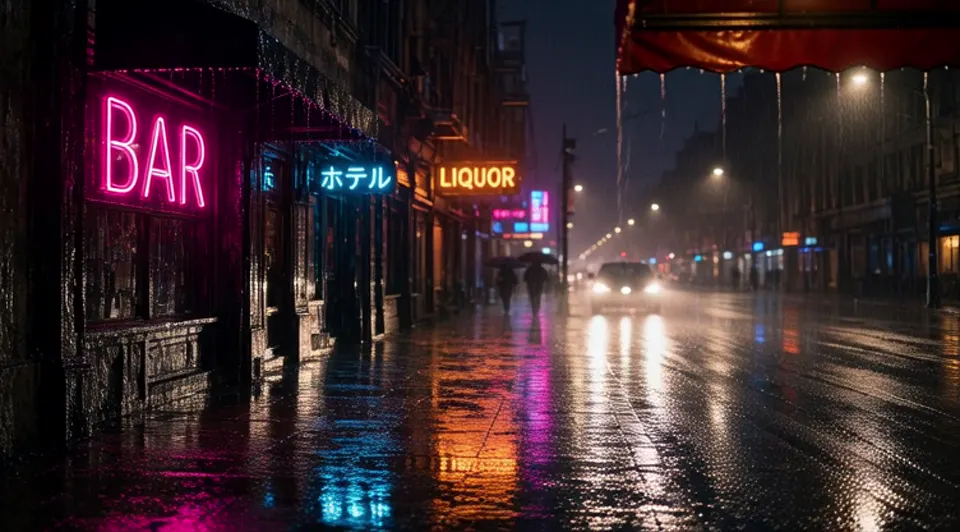
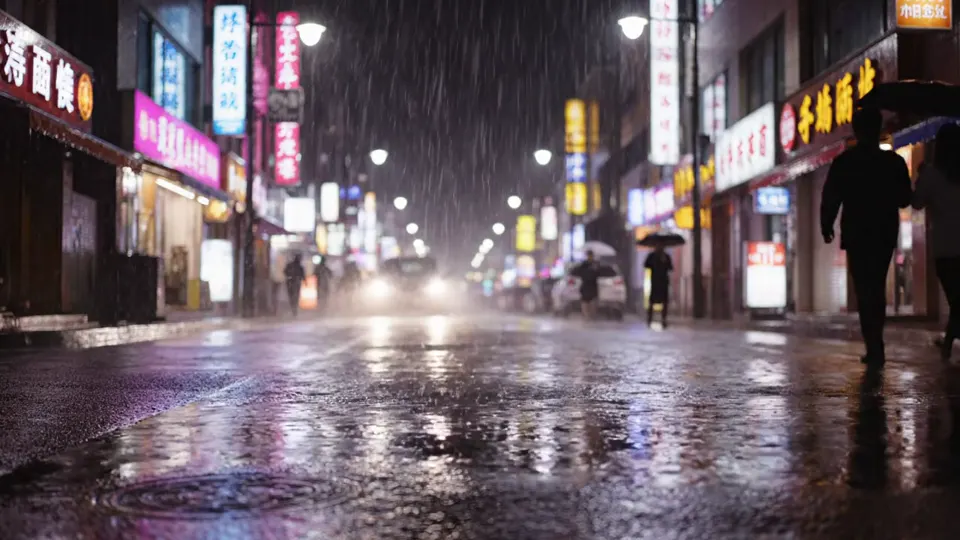
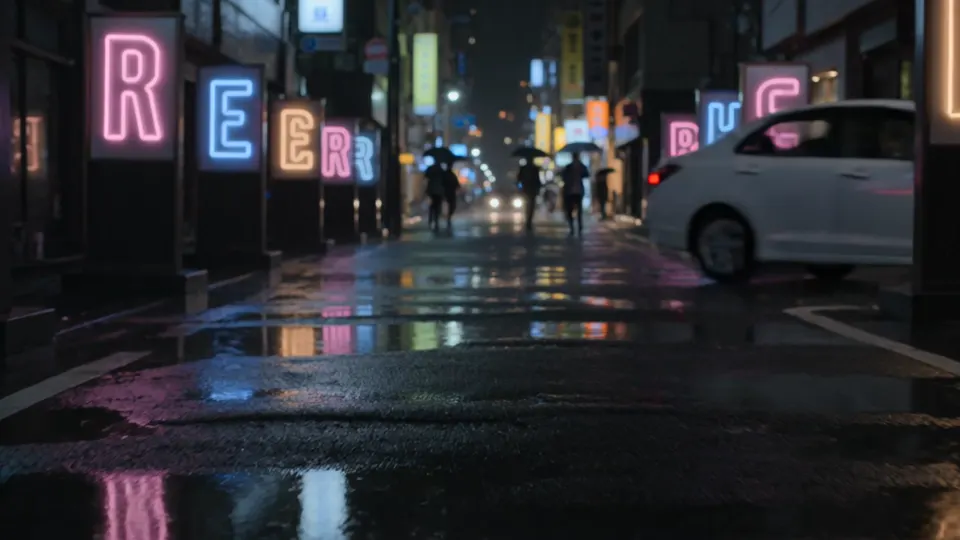
A city street at night after rain, first-person view at eye level. The camera slowly moves forward between rows of storefront signs. Pink, blue and amber neon letters reflect in black puddles on the asphalt. Fine rain hangs in the air, illuminated by streetlights. A car drives past, its headlights sweeping across the wet road. Blurred silhouettes of pedestrians carrying umbrellas appear in the distance.
We evaluated five elements: visible rain, reflections in puddles, a car, pedestrians with umbrellas and recognizable neon storefront signs.
| Runway Gen-4 | Grok Imagine |
|---|---|
 |
 |
| Veo 3.1 Fast | Kling 3.0 |
 |
 |
Stills from the clips. The videos themselves are on the video generation page.
Runway Gen-4. The scene has a dense, cinematic atmosphere, with reflections and pedestrians carrying umbrellas. However, the frame is dark, the car is barely visible and the rain itself does not appear. Cost: 13.2 credits ≈ 12 ₽.
Grok Imagine. Storefront signs, headlights, puddle reflections and the car are present. Pedestrians with umbrellas are only partly represented, and visible rainfall is missing. The image looks softer than the others because this generation used 480p. Cost: 15.84 credits ≈ 14 ₽.
Veo 3.1 Fast. The only model of the four to show the rain itself. A car passes through the frame, reflections and pedestrians with umbrellas are present, and the signs match the description. All five requirements were completed. Cost: 66 credits ≈ 60 ₽.
Kling 3.0. It produced the sharpest image in this scenario, with the car, reflections and pedestrians present. But the rain is missing, and the model interpreted "neon letters" literally, placing structures with individual letters along the street. Cost: 83.05 credits ≈ 75 ₽.
Requirement checklist
| Requirement | Runway | Grok | Veo | Kling |
|---|---|---|---|---|
| Visible rain | no | no | yes | no |
| Reflections in puddles | yes | yes | yes | yes |
| Car | partly | yes | yes | yes |
| Pedestrians with umbrellas | yes | partly | yes | yes |
| Neon signs shown as storefront signs | yes | yes | yes | no |
| Fully completed | 3/5 | 3/5 | 5/5 | 3/5 |
Why it happened and how to improve the prompt
Veo completed all five requirements, but Kling's result illustrates the problem of ambiguous wording. We wrote "neon letters," and the model treated them as separate objects. A clearer instruction would be: "Neon storefront signs with pink and blue lettering."
Only one model showed visible rainfall. In our original prompt, the rain appeared after the signs and reflections, even though it was one of the main requirements. A revised prompt could begin: "A city street at night during light rainfall. Raindrops are visible in the streetlights and fall onto the wet asphalt."
The original description included signs, puddles, rainfall, a car and pedestrians. For an initial attempt, we could focus on two or three main elements, such as rain, a moving car and headlight reflections. Additional details can be introduced after evaluating the main scene.
Task 2. Human movement: a barista behind the counter
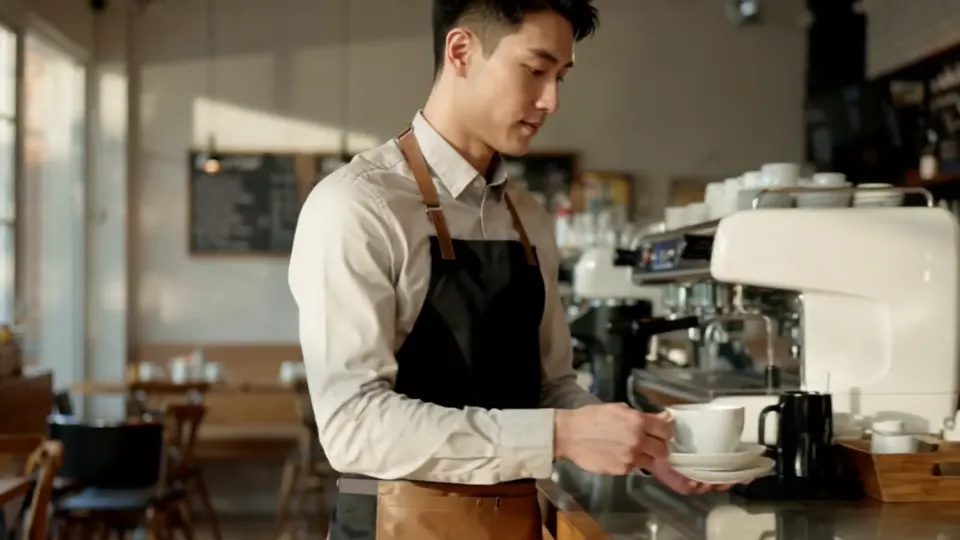
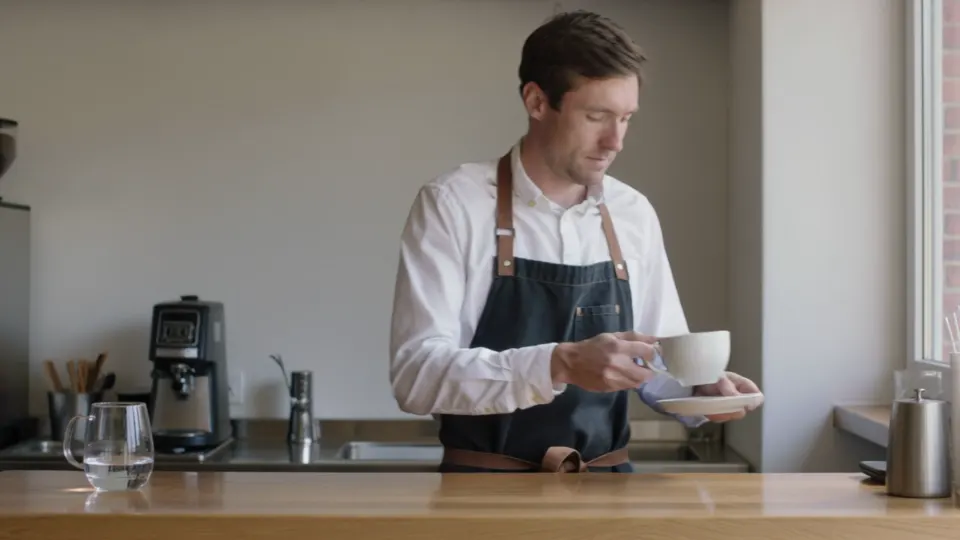
The second scenario tested a sequence of actions performed by one adult. The barista had to pick up a cup and saucer, move to the right, place the cup on the counter and turn toward the camera.
The prompt:
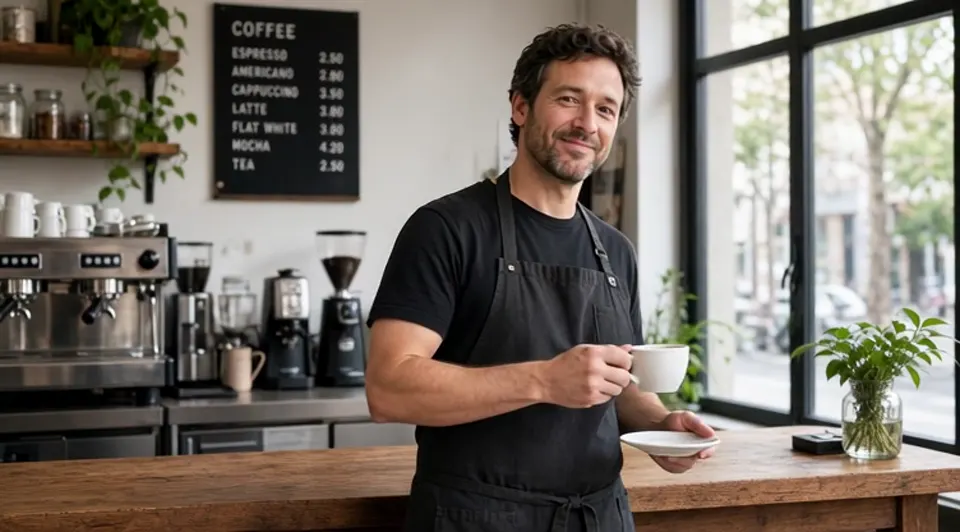
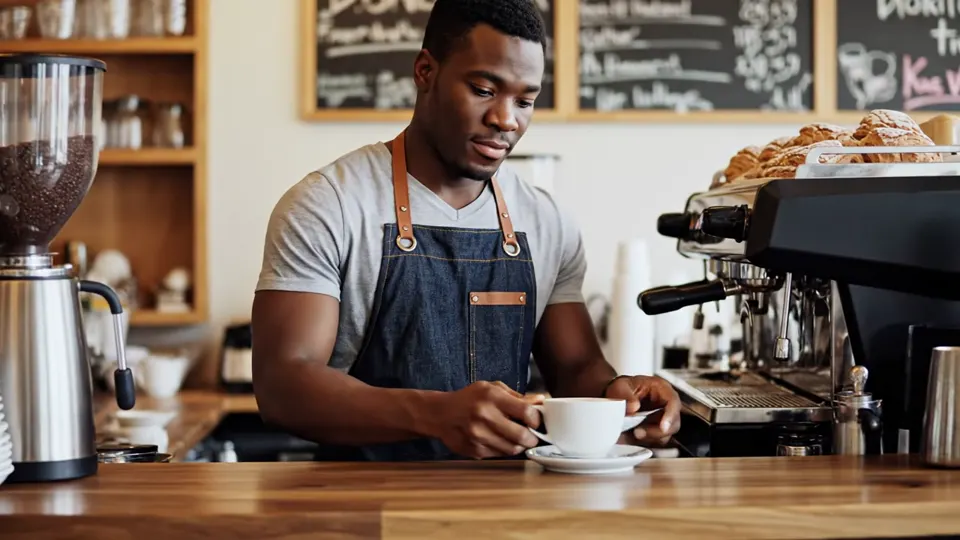
An adult barista stands behind a coffee shop counter, facing the camera, with both hands fully visible. The barista picks up a white cup by its handle with the right hand and holds a saucer with the left. The barista takes two steps to the right, places the cup on the counter, then turns toward the camera with a slight smile. Stationary camera, medium shot, soft daylight, one continuous take.
We evaluated five requirements: the objects in the correct hands, two steps to the right, placing the cup with the saucer, a final turn and smile, and a stationary camera with one continuous medium shot.
We started by reviewing one video from each model.
| Runway Gen-4 | Grok Imagine |
|---|---|
 |
 |
| Veo 3.1 Fast | Kling 3.0 |
 |
 |
Stills from the clips. The videos themselves are on the video generation page.
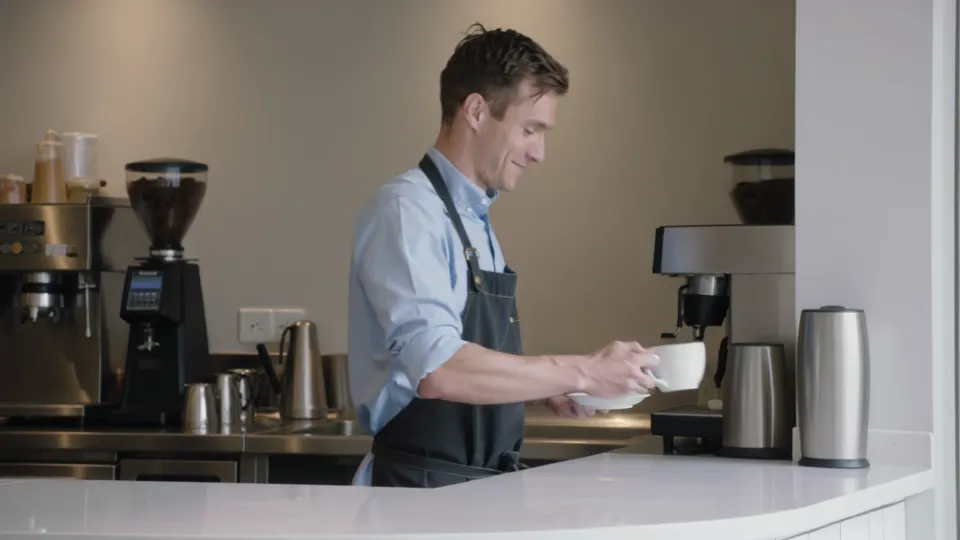
Runway Gen-4. It completed the action sequence: cup and saucer in the correct hands, steps to the right, placement of the cup and a smile at the camera. However, the camera moved despite the instruction to keep it stationary. Cost: 13.2 credits ≈ 12 ₽.
Grok Imagine. It completed all five requirements: correct objects, movement to the right, cup placement, a final turn with a smile and a stationary camera. The image is softer than the other results because of its 480p resolution. Cost: 15.84 credits ≈ 14 ₽.
Veo 3.1 Fast. The camera stays stationary and the final smile is present, but the barista does not take two steps to the right. The cup is placed in the original position, and an extra saucer appears on the counter. Cost: 66 credits ≈ 60 ₽.
Kling 3.0. It keeps the camera stationary and shows the steps to the right and the smile. However, the barista puts down the cup without the saucer, which remains in the left hand. Cost: 83.05 credits ≈ 75 ₽.
Requirement checklist: first attempt
| Requirement | Runway | Grok | Veo | Kling |
|---|---|---|---|---|
| Objects in the correct hands | yes | yes | yes | yes |
| Two steps to the right | yes | yes | no | yes |
| Cup placed with the saucer | yes | yes | partly | no |
| Turn toward camera and smile | yes | yes | yes | yes |
| Stationary camera | no | yes | yes | yes |
| Fully completed | 4/5 | 5/5 | 3/5 | 4/5 |
On the first attempt, Grok was the only model to complete all five requirements. Runway also reproduced the entire action sequence but failed to keep the camera stationary.
We then repeated the same prompt. Those results appear in the repeatability section below.
Why it happened and how to improve the prompt
In the first attempt, Runway and Grok completed the barista's full action sequence. Veo skipped the steps, while Kling mishandled the saucer. The scene demanded several consecutive actions within a short clip, including handling two objects.
For another attempt, we could simplify the scene: "The barista picks up the cup with the right hand and places it on the counter." Movement to the right or the head turn could then be tested separately. This reduces the number of simultaneous requirements, although the result still needs to be checked.
The instruction "stationary camera" appeared at the end of the prompt, and Runway did not follow it. A revised version could begin: "Stationary camera, medium shot of a barista behind a counter." For the cup and saucer, it also helps to describe where both objects should be at the beginning and end of the action.
Task 3. Product accuracy: a glass of hot tea
The third scenario recreated a commercial product shot. The models needed to preserve the shape of a transparent drinking glass, show the liquid level, generate steam and move the camera.
The prompt:
Commercial product shot. A transparent cylindrical drinking glass made of smooth glass sits on a dark wooden table. The glass contains hot amber-colored tea, with the liquid level just below the rim. A thin stream of steam rises upward. The camera moves smoothly from left to right, and a narrow reflection from a window travels across the glass surface. The glass remains stationary, with no text, handles or decorations.
We checked five requirements: cylindrical shape, no handle, tea just below the rim, visible steam and camera movement.
| Runway Gen-4 | Grok Imagine |
|---|---|
 |
 |
| Veo 3.1 Fast | Kling 3.0 |
 |
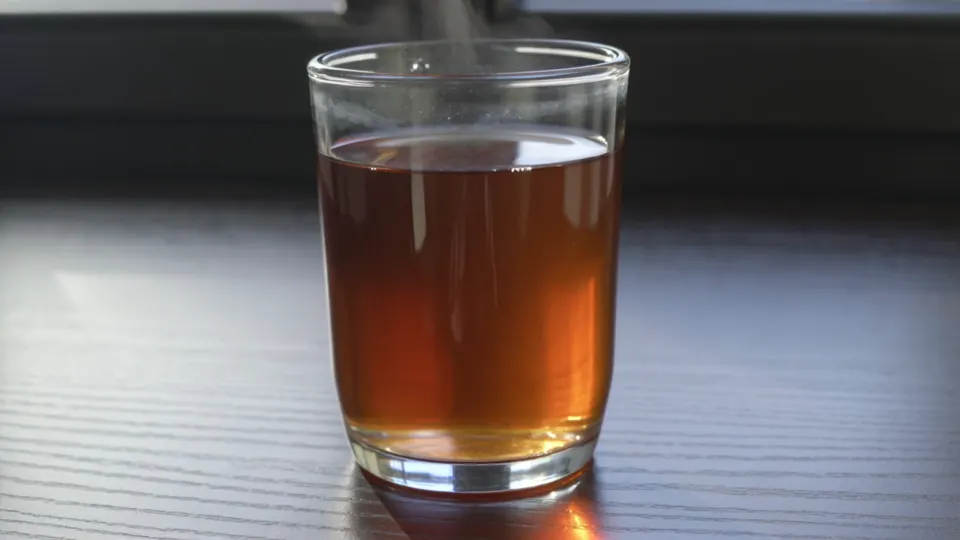 |
Stills from the clips. The videos themselves are on the video generation page.
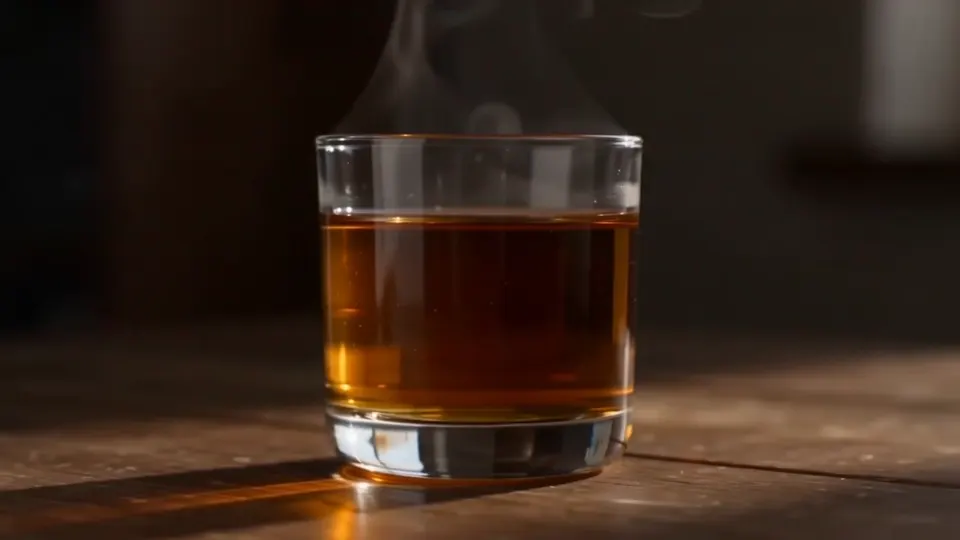
Runway Gen-4. Steam and camera movement are present, and the lighting is attractive. However, the glass is short and wide, with tea filling approximately two-thirds of it rather than reaching just below the rim. Cost: 13.2 credits ≈ 12 ₽.
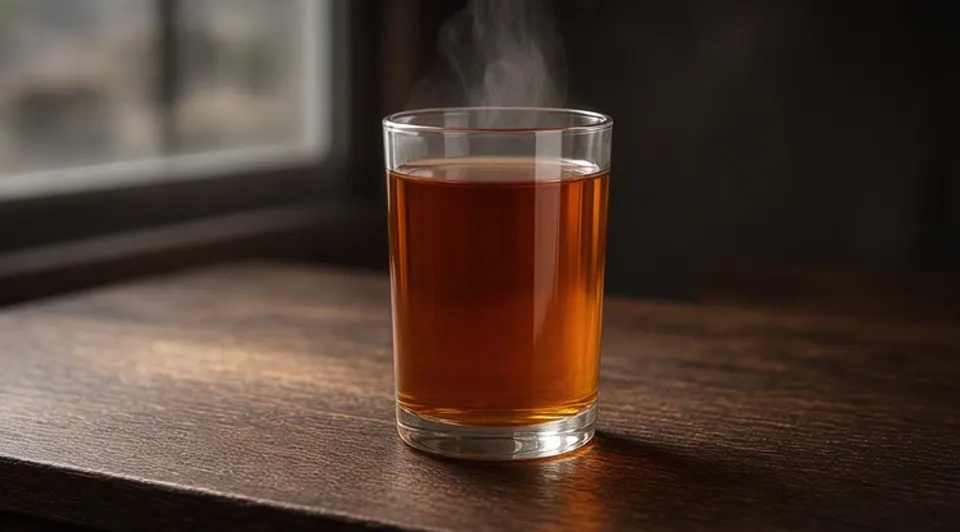
Grok Imagine. The closest match to the description: a tall cylindrical glass without a handle, tea almost reaching the rim and visible steam. The main weakness is that camera movement is barely noticeable. Cost: 15.84 credits ≈ 14 ₽.
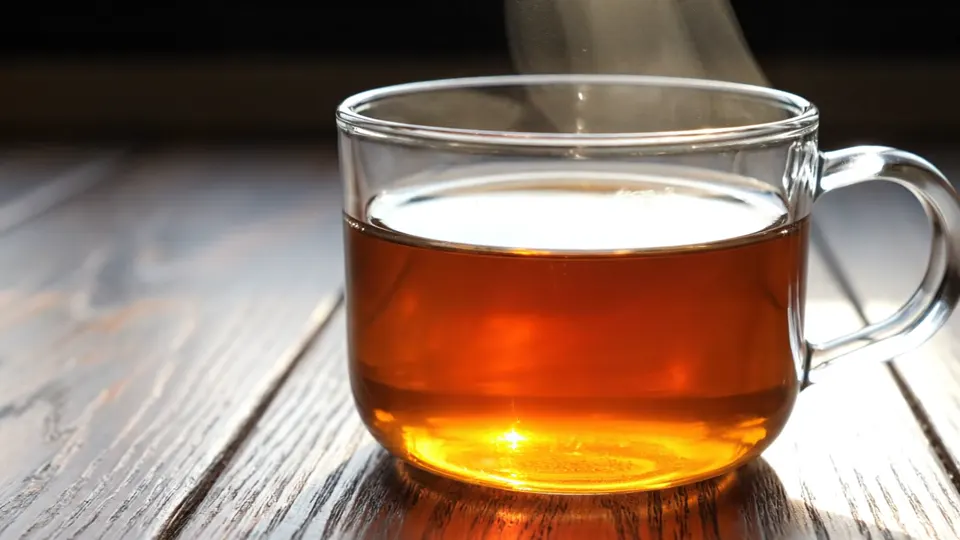
Veo 3.1 Fast. It produced the richest-looking image and the thickest steam of the four results. But instead of a drinking glass, the model generated a glass cup with a handle. The liquid level and camera movement only partly matched the prompt. Cost: 66 credits ≈ 60 ₽.
Kling 3.0. The glass has no handle, and the tea level matches the description. However, the glass narrows toward the bottom, the steam is barely visible and the camera hardly moves. Cost: 83.05 credits ≈ 75 ₽.
Requirement checklist
| Requirement | Runway | Grok | Veo | Kling |
|---|---|---|---|---|
| Cylindrical shape | partly | yes | no | partly |
| No handle | yes | yes | no | yes |
| Tea just below the rim | no | yes | partly | yes |
| Visible steam | yes | yes | yes | partly |
| Camera movement | yes | partly | partly | partly |
| Fully completed | 3/5 | 4/5 | 1/5 | 2/5 |
Why it happened and how to improve the prompt
Grok preserved the glass's key characteristics most accurately. Veo created an attractive image but added a handle despite the restriction. In a revised prompt, we would describe the desired construction positively: "A smooth drinking glass with straight sides and an even circular rim."
The models interpreted "cylindrical" differently. Runway made the glass short and wide, while Kling narrowed it toward the bottom. A more specific description could be: "The glass is twice as tall as it is wide, with straight, parallel sides."
Camera movement was barely noticeable in Grok and Kling. In another test, we would put the movement instruction first: "The camera moves smoothly from left to right in front of a stationary drinking glass." The object, liquid level and lighting can follow.
Repeatability test: three attempts with the same prompt
The first barista generation showed that Grok completed all five requirements, while Runway reproduced the actions but did not keep the camera stationary.
A single generation, however, cannot show how consistently a model follows the same instructions. We therefore ran the barista scene two more times with each model on the same day.
We did not change the prompt or settings. The result was 12 barista videos: three from Runway, three from Grok, three from Veo and three from Kling.
The five requirements remained unchanged:
- Cup in the right hand, saucer in the left.
- Two steps to the right.
- Cup placed on the counter with the saucer.
- Turn toward the camera with a smile.
- Stationary camera, one continuous medium shot.
Results of repeated generations
| Model | Attempt 1 | Attempt 2 | Attempt 3 | All five requirements |
|---|---|---|---|---|
| Runway Gen-4 | Actions 1–4 completed; camera moves | Actions 1–4 completed; camera moves | Close-up of hands, then a cut to the face; no steps | 0 out of 3 |
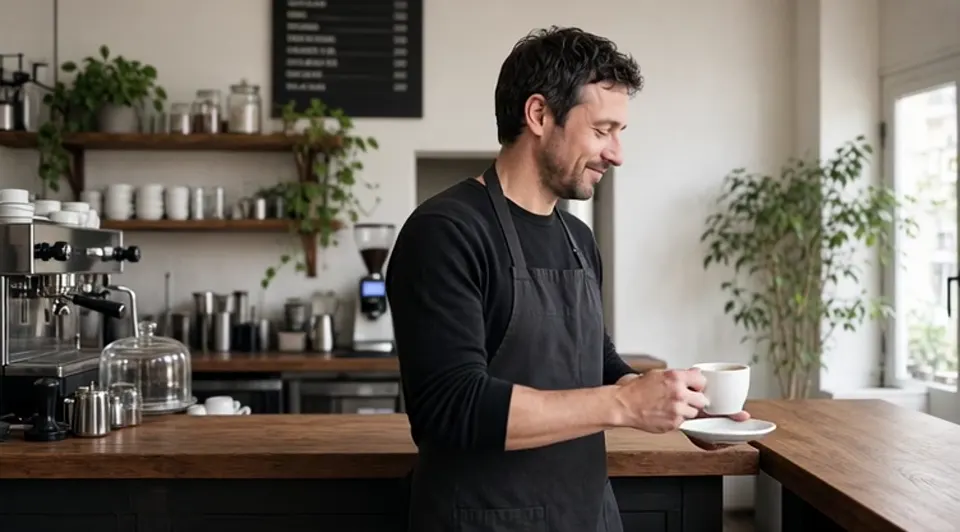
| Grok Imagine | All five completed | No steps to the right; everything else completed | Actions 1–4 completed; slight camera movement | 1 out of 3 |
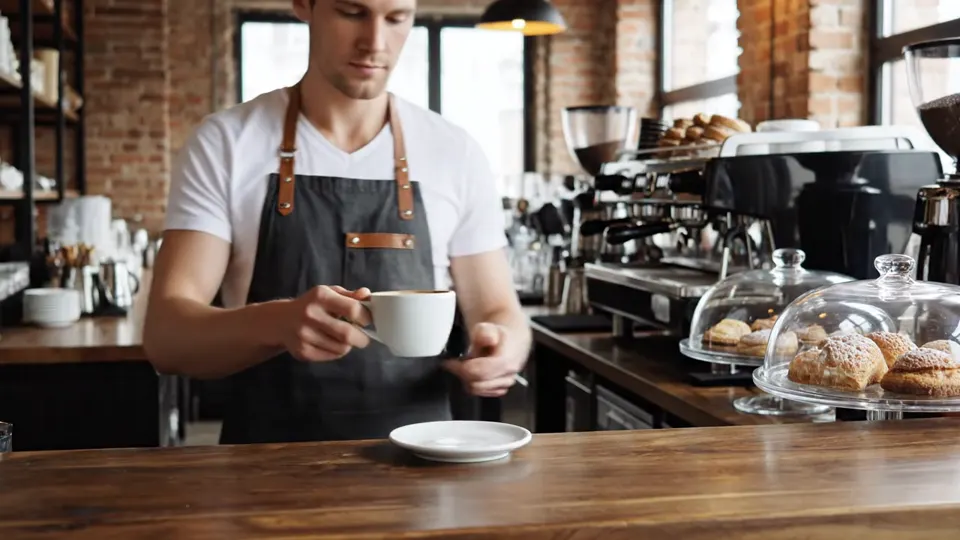
| Veo 3.1 Fast | No steps; extra saucer | No steps; extra cup and saucer from the first frame | Character enters from the left; cup placed on an existing saucer | 0 out of 3 |
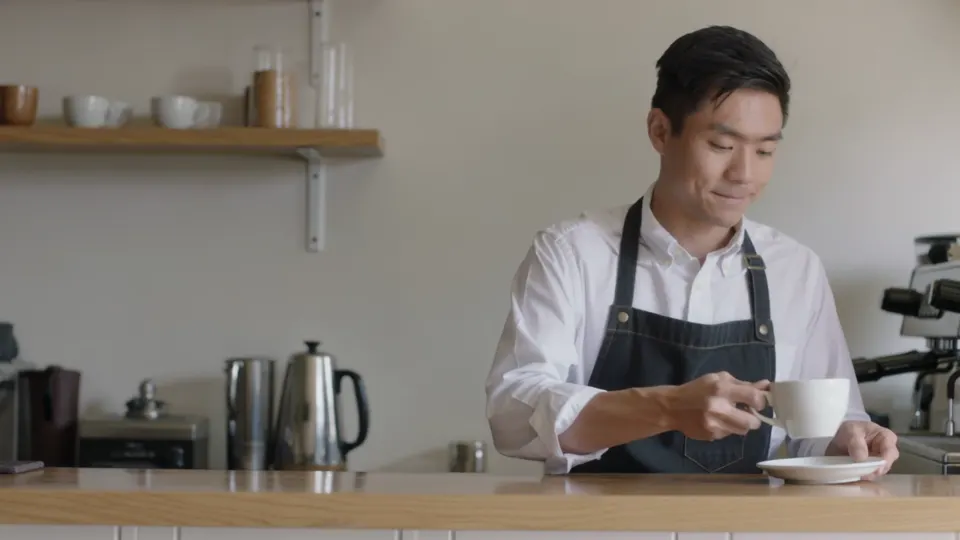
| Kling 3.0 | Saucer remains in the left hand | All five completed | All five completed | 2 out of 3 |
| Runway Gen-4 | Grok Imagine | Veo 3.1 Fast | Kling 3.0 | |
|---|---|---|---|---|
| Attempt 2 | 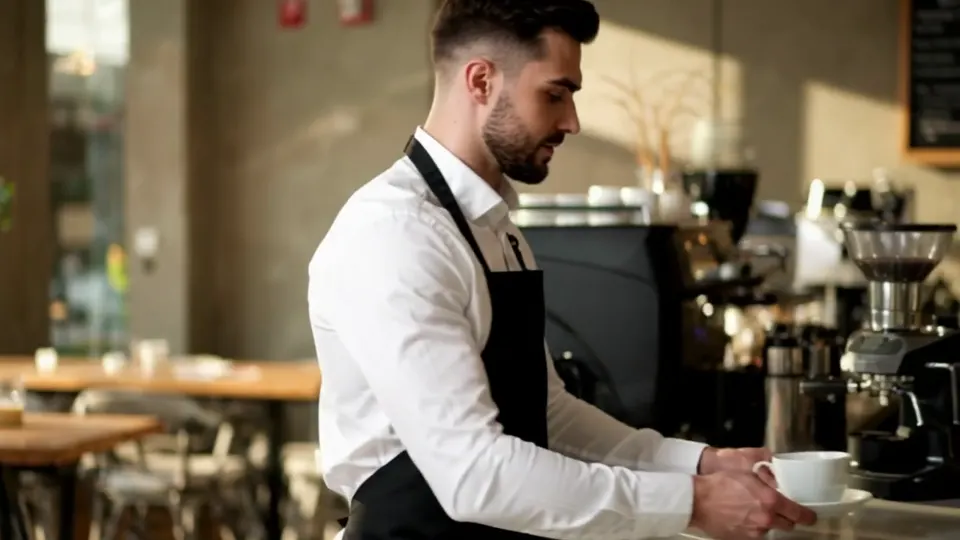 watch the clip |
 watch the clip |
 watch the clip |
 watch the clip |
| Attempt 3 | 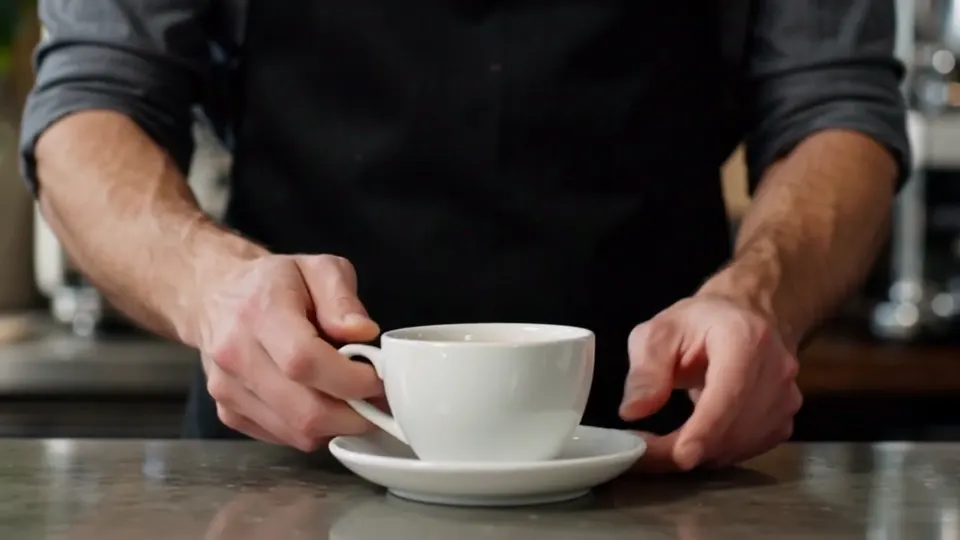 watch the clip |
 watch the clip |
 watch the clip |
 watch the clip |
Stills from the second and third attempts. The first attempt is shown in Task 2. Each still links to the clip itself.
Runway Gen-4: consistent actions, repeated camera problems
In the first two attempts, Runway reproduced the full barista action sequence, but the camera moved both times.
The third attempt was noticeably different. The model started with a close-up of the hands, then cut to the face. There were no steps to the right, and the continuous medium shot was lost. The cup was still placed on the counter, and the smile was present.
None of the three attempts completed all five requirements.
Runway preserved the main sequence twice, but failed to maintain the requested camera position or shot structure in all three generations. This was a recurring issue in our experiment.
Grok Imagine: a perfect first attempt did not repeat
Grok completed all five requirements in the first generation.
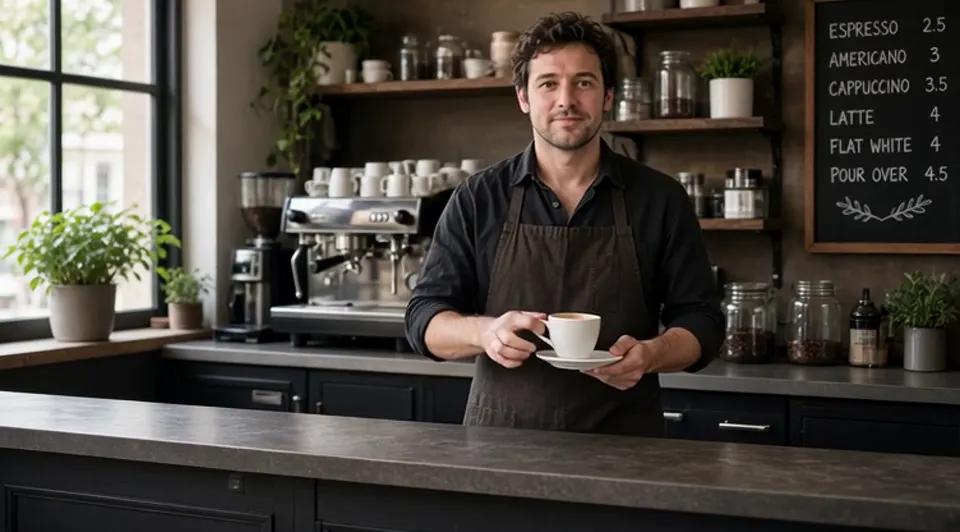
In the second attempt, the barista did not take steps to the right. All other conditions were completed.
In the third attempt, actions 1–4 were present, but the camera moved slightly.
That gives Grok one fully successful generation out of three.
The model demonstrated that it could complete the entire sequence, but individual requirements disappeared in subsequent runs with the same prompt. All three videos used 480p resolution.
Veo 3.1 Fast: steady camera, recurring movement and object errors
In the first attempt, Veo omitted the steps to the right and added an extra saucer.
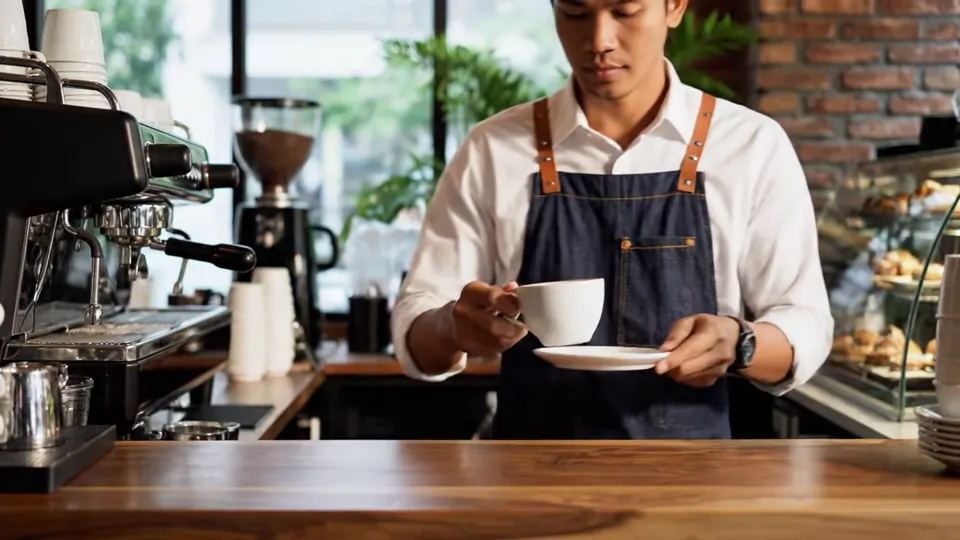
In the second, the barista again failed to take the requested steps. An extra cup and saucer were already present on the counter in the first frame.
In the third, the character entered from the left and reached the intended position, but placed the cup on a saucer that was already on the counter.
In all three clips, the camera remained stationary and the final smile was present.
None of the attempts met every requirement. In this test, Veo consistently maintained the camera position but did not correctly combine the movement and object requirements.
Kling 3.0: two complete results out of three
In the first attempt, Kling showed the steps to the right and the smile while keeping the camera stationary. However, the saucer stayed in the left hand when the cup was placed down.
In the second and third attempts, the model completed all five requirements.
That gives Kling two fully successful generations out of three.
Based only on the first attempt, Kling looked weaker than Runway and Grok at handling the objects. After repeating the prompt, it had the highest number of fully completed attempts in this task.
Cost of the repeatability test
| Model | Three attempts | Fully completed |
|---|---|---|
| Runway Gen-4 | 39.6 credits ≈ 36 ₽ | 0 out of 3 |
| Grok Imagine | 47.52 credits ≈ 43 ₽ | 1 out of 3 |
| Veo 3.1 Fast | 198 credits ≈ 180 ₽ | 0 out of 3 |
| Kling 3.0 | 249.15 credits ≈ 227 ₽ | 2 out of 3 |
The eight additional generations cost 356.18 credits ≈ 324 ₽. Including the original videos, the complete experiment now consists of 20 videos costing 890.45 credits ≈ 810 ₽.
These numbers do not mean that three attempts are required to obtain a suitable result. We repeated the prompt specifically to examine how the models performed under unchanged conditions.
How repeatability changed our conclusions
Based on one attempt, Grok led the barista task by completing all five requirements. Runway also reproduced every action but moved the camera.
Across three attempts, Kling completed all five requirements most often: twice out of three. Grok did so once. Runway and Veo did not fully complete the requirements in any attempt.
The results show two different characteristics: how well an individual generation follows the prompt and how often that performance repeats.
The more expensive Kling was more consistent at completing the entire checklist in this particular task. But three attempts are not enough to conclude that it will always be more reliable than the other models.
Summary: 15 requirements across three tasks
We checked five requirements in each of the initial three scenarios. That gives each model a total of 15 requirements.
Only "yes" ratings count as fully completed. Requirements marked "partly" are excluded from the total.
The barista column uses the first attempt. Repeated generations appear in the final column.
| Model | Rainy street | Barista, attempt 1 | Glass of tea | Total "yes" out of 15 | All 5 barista requirements across 3 attempts |
|---|---|---|---|---|---|
| Runway Gen-4 | 3/5 | 4/5 | 3/5 | 10/15 | 0/3 |
| Grok Imagine | 3/5 | 5/5 | 4/5 | 12/15 | 1/3 |
| Veo 3.1 Fast | 5/5 | 3/5 | 1/5 | 9/15 | 0/3 |
| Kling 3.0 | 3/5 | 4/5 | 2/5 | 9/15 | 2/3 |
How to interpret the results
Across the initial attempts, Grok Imagine completed the most requirements: 12 out of 15. Runway followed with 10 out of 15. Veo and Kling each completed nine.
However, this count does not account for the importance of individual requirements. In product advertising, generating the wrong object shape may be more serious than weak camera movement. In a rainy street scene, missing the rain itself may matter more than the detail of the storefront signs.
The matrix also does not measure how close the "partly" results were to the prompt. Barely noticeable camera movement and a completely incorrect object shape are different problems.
Repeated generations changed the picture for the barista task. Kling completed all five requirements in two out of three attempts, even though its first generation contained a saucer error.
The summary therefore does not identify a universal winner. It shows accuracy across three initial tasks and repeatability in one of them.
Which AI video generator should you choose?
The best AI video generator depends on what your scene requires. Our experiment highlights differences in following specific instructions, while Neuromia also offers models for other types of video.
For quick drafts and testing ideas
Runway Gen-4 and Grok Imagine are options for testing short scenes at a relatively low cost.
In our experiment, Runway generated five seconds at 720p for 13.2 credits ≈ 12 ₽. Grok generated six seconds at 480p for 15.84 credits ≈ 14 ₽.
In the initial attempts, Grok completed 12 of the 15 requirements, while Runway completed 10.
Both models reproduced the barista's full action sequence in the first run. But repeated generations revealed limitations: Runway failed to maintain the requested shot structure in all three attempts, while Grok completed all five requirements only once.
If you want to test a composition or movement idea, a lower-cost generation lets you evaluate the result before selecting a more expensive model. One successful clip does not guarantee the same outcome when repeated.
For product advertising
In the glass-of-tea test, Grok Imagine fully completed four of the five requirements. It preserved the shape, lack of handle, liquid level and visible steam.
Runway completed three requirements, Kling completed two, and Veo completed one.
If an advertisement needs to show a particular product, consider using a source photograph. The image can establish the product's appearance while the prompt describes its movement.
Neuromia includes Midjourney Video, Hailuo 2.3 Standard and Wan 2.6 Fast for working with images. These models were not included in our comparison.
For product advertising, inspect the object's shape, material and important details after every generation. Attractive lighting cannot compensate for generating the wrong product.
For scenes involving people
The first attempt and the repeated generations tell different stories.
Based only on the initial clip, Grok completed all five requirements, while Runway completed all the actions but failed to keep the camera stationary.
Across three generations, Kling 3.0 completed the full checklist most often: twice out of three. Grok succeeded once, while Runway and Veo did not fully complete it.
Your choice therefore depends on the priority.
For a lower-cost initial test of an action sequence, Runway or Grok may be suitable. If completing all five requirements from our barista scenario is critical, Kling performed better across the repeated attempts.
This observation applies to the specific barista prompt. Another scene could produce different results.
To reduce the number of errors, try shortening the sequence to one or two actions. When several objects are involved, specify their positions at the beginning and end of the scene.
For video with sound and dialogue
Among the tested models, Veo 3.1 Fast was generated with sound enabled. Its eight-second 720p clip cost 66 credits ≈ 60 ₽.
In the rainy street scenario, Veo was the only model to complete all five visual requirements. However, we did not evaluate sound quality separately.
The full Veo 3.1 model and other audio-capable options are also available. Check the specific configuration when choosing a model for dialogue.
A visual test cannot determine which model produces better speech, ambient sounds or lip synchronization.
For longer videos
Our tested clips lasted between five and eight seconds.
For longer scenes, Kling 4.0 and Seedance 2.5 support videos up to 30 seconds. Seedance 2.0 supports durations from four to twelve seconds.
We did not test these models on longer stories. The supported duration indicates that a longer clip can be generated, but does not guarantee accurate execution of a longer action sequence.
Models that were not included in the test
The following models are also available in Neuromia. Their features and prices are provided to help you choose a tool, but our experiment does not evaluate their performance.
| Model | What it is used for | Price |
|---|---|---|
| Veo 3.1 | Video with sound and dialogue, 720p | From 275 credits ≈ 250 ₽ per video |
| Veo 3.1 Lite | AI video generation | From 33 credits ≈ 30 ₽ |
| Kling 4.0 | Videos up to 30 seconds, references and keyframes | 31.35 credits/sec at 720p |
| Seedance 2.5 | Videos up to 30 seconds | 30.8 credits/sec at 480p; 69.3 credits/sec at 720p |
| Seedance 2.0 | Videos lasting 4–12 seconds | 20.9 credits/sec at 480p; 45.1 credits/sec at 720p |
| Wan 2.6 Fast | Working with photos, 720p | 3.7 credits/sec |
| Hailuo 2.3 Standard | Photo animation, 6 seconds, 768p | 33 credits ≈ 30 ₽ |
| Midjourney Video | Image animation | From 44 credits ≈ 40 ₽ |
| PixVerse V6 | AI video generation, 360p | From 4.4 credits/sec |
| Kling Avatar Standard | Talking avatar from a photo and audio, 720p | 11.11 credits/sec |
The price depends on the settings, so check the total for your configuration in the editor before you start.
For more model information, read our detailed comparison of AI video model features and prices. You can also use ready-made AI video prompts when preparing your own experiments.
How much does AI video generation cost?
The price depends on the model, duration, resolution and sound options. In our experiment, a single video cost between 13.2 and 83.05 credits, approximately 12–70 ₽.
These are prices for the specific tested configurations, not the minimum rates across all available models.
Cost of one video and three attempts
| Model | One video | Three videos |
|---|---|---|
| Runway Gen-4 | 13.2 credits ≈ 12 ₽ | 39.6 credits ≈ 36 ₽ |
| Grok Imagine | 15.84 credits ≈ 14 ₽ | 47.52 credits ≈ 43 ₽ |
| Veo 3.1 Fast | 66 credits ≈ 60 ₽ | 198 credits ≈ 180 ₽ |
| Kling 3.0 | 83.05 credits ≈ 75 ₽ | 249.15 credits ≈ 227 ₽ |
Three attempts are used here to compare costs. We are not suggesting that exactly three generations are necessary to achieve a suitable result.
In the barista task, we ran each model three times to examine repeatability. With unchanged settings, Kling completed every requirement twice, Grok once, and Runway and Veo did not fully complete them.
These results show that the cost of one video and the cost of obtaining a suitable result may differ. But three attempts are not enough to calculate the average number of generations needed for every task.
Total experiment budget
| Part of the experiment | Videos | Cost |
|---|---|---|
| Three initial scenarios | 12 | 534.27 credits ≈ 486 ₽ |
| Additional barista generations | 8 | 356.18 credits ≈ 324 ₽ |
| Complete experiment | 20 | 890.45 credits ≈ 810 ₽ |
All costs are from generations performed on November 11, 2026, using the specified settings.
Changing duration, resolution or sound options may change the total price.
How credits work
Neuromia does not require a subscription. You add credits to a shared balance and pay for each generation.
The price of the selected model and settings is displayed before generation. If generation fails due to a technical error, the credits are returned to your balance. If a video is successfully generated, another attempt with a revised prompt is charged separately.
We give you 10 credits on sign-up. The lowest-priced video costs 13.2 credits, so the initial bonus is not enough to generate a video.
For your own comparisons, record the actual cost of each clip. If you change the model or settings, save the new configuration alongside the result.
What this test does not show
Twenty videos allow us to compare three prompts and examine repeatability on one of them. The experiment still has limitations:
Repeatability was tested only on the barista task. We ran each model three times on that scenario. The rainy street and glass of tea were generated only once per model. Three attempts are not enough to measure overall model reliability.
The settings were different. Runway and Kling generated five-second clips, Grok generated six seconds, and Veo generated eight. Grok used 480p, while the others used 720p. This limits direct comparisons of image detail and cost.
Audio was not evaluated. Veo was generated with sound enabled, but we did not compare audio quality, dialogue or speech synchronization. These results cannot identify the best model for dialogue.
Only three scenarios were tested. We did not examine other products, several characters in one scene, longer stories or animation from source photos. Accuracy on one drinking glass does not guarantee the same result for another object.
Models can change. All generations were performed on November 11, 2026. An updated model may produce a different result from the same prompt. For reproducible comparisons, keep the date, model, prompt and settings.
The best AI for video generation on one task may perform worse on another. Our experiment describes observed results, not a permanent model ranking.
Frequently asked questions
What is the best AI video generator?
There was no single winner in our experiment. Veo 3.1 Fast completed all five rainy street requirements, Grok Imagine achieved 12 out of 15 fully completed requirements across the initial attempts, and Kling 3.0 completed the full barista checklist most often in repeated runs. Choose a model based on your task and account for differences in settings.
Which AI video generator supports sound?
In our test, Veo 3.1 Fast was generated with sound enabled and cost 66 credits ≈ 60 ₽ for eight seconds at 720p. Other available options include Veo 3.1 and PixVerse V6 with sound support. We did not evaluate audio quality in this experiment.
How much does AI video generation cost?
One clip in our comparison cost between 13.2 credits ≈ 12 ₽ and 83.05 credits ≈ 75 ₽. Three barista attempts cost from 39.6 credits ≈ 36 ₽ with Runway to 249.15 credits ≈ 227 ₽ with Kling. The complete 20-video experiment cost 890.45 credits ≈ 810 ₽.
Which AI video generator is best for product advertising?
In the glass-of-tea test, Grok Imagine completed four of the five requirements and preserved the object's shape most accurately. The video cost 15.84 credits ≈ 14 ₽. For advertising a specific product, you can also consider models that animate an existing photograph, but we did not compare them in this experiment.
Can you trust a single AI video generator test?
One generation reveals a specific result but cannot establish repeatability. In the barista task, Grok completed all five requirements on its first attempt, but Kling completed the full checklist more often across three runs. Treat these findings as observations from November 11, 2026, rather than guarantees of future model behavior.
What to do next
Choose the prompt closest to your project and run it with a suitable model. The Neuromia AI video generator includes the tested models and displays the price before you confirm a generation. Compare your result against individual requirements, such as action sequence, camera movement and object shape. If a requirement is missing, simplify the sequence or clarify the instruction before your next attempt.