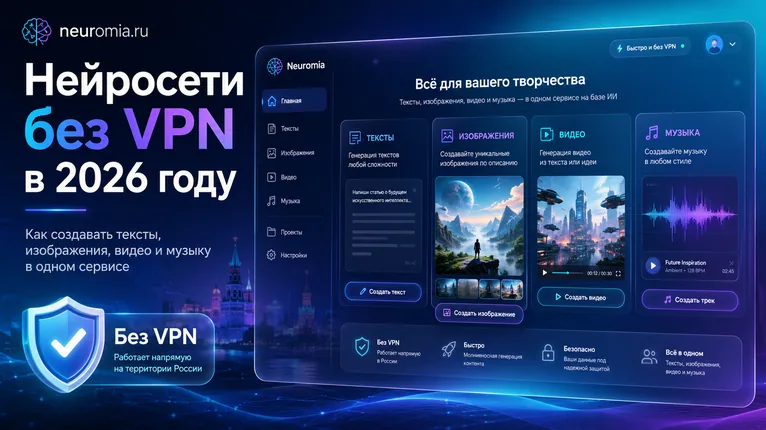
AI Without a VPN in 2026: Create Text, Images, Video, and Music in One Service
How to create text, images, video, and music with AI in 2026 without a VPN — in a single service, with no extra sign-ups or switching between dozens of websites.
Not long ago, working with neural networks was complicated: one service for text, another for images, a third for video, a fourth for music. One requires a foreign bank card, another's website won't open, a third has an English-only interface, and elsewhere the free limits run out before you even get the hang of it.
In 2026 the situation has changed. AI is no longer a toy for enthusiasts — it has become an everyday working tool for bloggers, designers, marketers, entrepreneurs, students, and website owners. With AI you can now write copy, brainstorm ideas, create images, generate video, make music, prepare product descriptions, or put together ad creatives.
The main question is no longer whether such AI models exist. They do. The real problem is how to use them conveniently — without a VPN, without endless sign-ups, and without constantly switching between dozens of websites.
That is exactly why AI aggregators — services that bring different AI models together in one place — are becoming more and more popular.
What is an AI aggregator
An AI aggregator is an online platform where you can run different AI tools through a single website.
Instead of hunting for a separate service for text, another image generator, a dedicated video model, and yet another AI for music, you open one dashboard and pick the task you need.
Such services typically let you:
- generate text;
- create images from a description;
- animate photos;
- make short videos;
- write prompts;
- create music;
- edit content;
- test different models;
- compare results across different AI models.
It is convenient because you don't have to figure out a new interface, payment terms, limits, and settings every single time.
Why people search for AI without a VPN
The search query "AI without a VPN" became popular for a reason. Many foreign AI services come with restrictions: they may be unavailable in certain countries, require a foreign phone number, refuse familiar payment methods, or work unreliably when your IP changes. How people get around that in practice is covered separately: how to pay for AI services from Russia — six working methods with real fees and risks.
For a regular user, all of this turns into an unnecessary headache.
People don't want to configure a VPN, look for workarounds, and dig through forums — they just want to open a website, type a request, and get a result.
This matters most for those who use AI not as an experiment but for actual work:
- writing website copy;
- creating product listings;
- preparing social media posts;
- designing ad banners;
- generating videos for Reels, Shorts, or TikTok;
- making music for videos;
- building presentations;
- looking for content ideas.
When you need AI every day, stable access matters more than flashy promises.
Why one service beats ten different websites
At first glance it seems fine to use separate AI services: one site for text, a second for images, a third for video, a fourth for music.
In practice, this quickly gets in the way.
Every service has its own rules:
- a separate registration;
- different limits;
- different pricing plans;
- different generation queues;
- different prompt formats;
- different interface languages;
- different payment requirements;
- different file upload restrictions.
As a result, you spend more time on technical hassle than on actually creating content.
An aggregator solves this problem. You work in a single interface and pick the right tool for the job. Need an image — launch the image generator. Need a video — choose a video model. Need a product description — use a text model. Need a soundtrack — switch to music generation.
It's simpler and faster.
What you can do with AI in 2026
Today's neural networks go far beyond simple text answers. They cover almost the entire content creation cycle.
Text
AI helps write articles, posts, product descriptions, ads, scripts, emails, headlines, and ideas for publications.
For example, you can use an AI model to:
- write an SEO article;
- outline a landing page structure;
- create a product description;
- prepare a Telegram post;
- write ad copy;
- rewrite dry text in a livelier voice;
- condense a long piece;
- translate text into another language;
- come up with blog ideas.
The key is not to copy the output blindly. Good text still needs to be checked, edited, and adapted for your audience.
Images
Image generation has become one of the most in-demand AI tasks. Neural networks can now create illustrations, covers, banners, avatars, backgrounds, product cards, and ad creatives.
These tools are especially useful for:
- website owners;
- marketers;
- designers;
- bloggers;
- SMM specialists;
- marketplace sellers;
- Telegram channel authors;
- content creators for TikTok, Reels, and Shorts.
You can describe a scene in words, pick a style, and get a finished image. For example: "a cover for an article about neural networks in a dark blue futuristic style" or "a realistic banner for an online service ad."
Video
AI video is one of the fastest-growing categories. Neural networks can create clips from a text description, animate images, add motion, change styles, and produce short scenes for social media.
Such videos are used for:
- Reels;
- YouTube Shorts;
- TikTok;
- ad creatives;
- presentations;
- intros;
- stories;
- promo clips;
- music visualizations.
For business this is especially interesting, because you don't always need to shoot video by hand. Sometimes an idea, an image, and the right prompt are enough.
Music
Music AI models let you create tracks, background melodies, jingles, ambient music, and sound ideas for videos.
It comes in handy when you need to:
- add a background track to a video;
- create a musical intro;
- produce a track for a short clip;
- set the mood for an ad;
- get a unique sound without endlessly digging through stock libraries.
Of course, before any commercial use you should always check the terms and licenses of the specific service. But as a tool for ideas and fast content creation, AI music has already become genuinely useful.
Who benefits most from having all AI in one place
An AI aggregator isn't just for people who "want to try AI." It pays off in real work.
Bloggers
A blogger can use AI for ideas, scripts, covers, short videos, music, and post captions. It speeds up content production and makes it easier to experiment with new formats.
Business owners
An entrepreneur can quickly create website copy, ads, product listings, visuals, banners, and promo materials without constantly hiring different specialists.
SMM specialists
For SMM, AI is especially valuable: you constantly need posts, stories, creatives, Reels ideas, captions, headlines, and visuals. One service with multiple AI tools saves a lot of time.
Marketers
A marketer can test hypotheses faster: generate several ad variants, produce different banners, prepare landing page ideas, write a message sequence, or create a video creative.
Designers
Designers use AI not as a replacement but as an accelerator. It helps find ideas, create drafts, generate backgrounds, styles, references, and visual concepts.
Students and professionals
AI helps explain complex topics, structure information, take notes, prepare presentations, write outlines, and get up to speed on new subjects quickly.
Why price shouldn't be your only criterion
Many people look for the cheapest AI service or a completely free one. That's understandable, but price is not the only thing that matters.
It's worth looking at several factors:
- which models are available;
- whether the interface is available in your language;
- how fast generation is;
- what the limits are;
- how easy it is to top up your balance;
- whether you can create different types of content;
- whether your generation history is saved;
- whether the dashboard is easy to use;
- whether the service fits your specific tasks.
Sometimes a cheap tool turns out to be inconvenient: few features, poor quality, unstable performance, or overly strict limits. And sometimes one universal service is cheaper than paying for several separate subscriptions.
How to choose the right AI model for your task
Not every neural network is equally good at everything. One model writes better text, another excels at images, a third handles video best, and a fourth is made for music.
Before generating, figure out exactly what you need.
If you need text — be specific. Not just "write an article," but "write a 1,000-word blog article for an online store, with a clear structure and no jargon."
If you need an image — describe the style, composition, colors, mood, camera angle, and details.
If you need a video — specify what should move, the camera work, the scene, the mood, and the ending.
If you need music — describe the genre, tempo, mood, instruments, and what the track is for.
The more precise the request, the higher the chance of getting a good result on the first or second try.
Common mistakes when working with AI
Many people get disappointed with AI not because the model is bad, but because they use it too vaguely.
Frequent mistakes:
- writing a prompt that's too short;
- not explaining the context;
- not specifying the output format;
- expecting a perfect answer on the first try;
- not editing the generated text;
- using the same prompt for different tasks;
- not comparing variants;
- not fact-checking;
- ignoring the model's limitations.
A neural network is a tool. It works better when the user knows what they want to get.
Why Neuromia makes working with AI easy
Neuromia is a service for people who want to use AI without unnecessary complexity. Instead of opening dozens of different websites, you can work with a range of AI tools in one place.
The platform lets you use neural networks to create images, video, text, and music. This format is especially convenient if you regularly produce content for a website, social media, ads, or personal projects.
The core idea is simple: less technical hassle — more results.
You choose the type of generation you need, write a request, and get a finished result. It works both for beginners just starting out with AI and for those who already use neural networks regularly.
How to start using AI without the hassle
The easiest path is not to try to master every model at once, but to start with a specific task.
For example:
- create a cover for an article;
- write a Telegram post;
- come up with a script for a short video;
- make an image for an ad;
- generate music for a clip;
- prepare a product description;
- improve an old text on your website.
After that, you can experiment with different styles, prompts, and formats.
A good strategy is to save your successful prompts. If one prompt produced a good result, you can use it as a base for future generations.
Will AI replace specialists or help them work faster?
AI does not replace taste, experience, and understanding of the task. A neural network can quickly produce text, an image, or a video, but the final call is still made by a human.
A good specialist uses AI as an amplifier:
- collecting ideas faster;
- producing drafts faster;
- testing variants faster;
- packaging content faster;
- getting from idea to result faster.
The wrong approach is expecting the AI to do everything perfectly on its own. The right approach is to steer the process and refine the output to fit your task.
Conclusion
In 2026, neural networks have become an ordinary working tool. With them you can write text, create images, generate video, make music, and quickly prepare content for different platforms.
But juggling dozens of separate services is inconvenient. That's why AI aggregators are more relevant than ever: they gather different AI tools in one place and let you work faster.
If you're looking for a simple way to use AI for text, images, video, and music, try Neuromia. It's a convenient option for anyone who wants to create content without extra setup, complicated sign-ups, and constant switching between platforms.
FAQ
What is an AI aggregator?
An AI aggregator is a service where different AI tools are gathered in one place. Through a single website you can work with text, images, video, music, and other content formats.
Can I use AI without a VPN?
Yes. The easiest way is to use services that provide access to AI tools through their own platform and work right in your browser.
Which AI models do I need for content creation?
For content, the most commonly used are text models, image generators, video models, and music AI. Together they cover almost the entire cycle: idea, text, visuals, video, and sound.
Which is better — separate AI services or one aggregator?
If you use AI rarely, you can try individual services. If you need AI regularly, an aggregator is more convenient: fewer sign-ups, less switching, and it's easier to work across different formats.
Is Neuromia suitable for beginners?
Yes. The service works well for people just starting out with AI: you pick the type of generation you need, write a request, and get a result with no complicated setup.
Can I use AI for business?
Yes. AI helps create ad copy, images, product descriptions, post ideas, video creatives, music, and other marketing materials.
How do I get the best results from an AI model?
Write a specific prompt: state the task, style, format, audience, details, and the result you expect. The more precise the prompt, the better the output.